HydroMan is professional 3D hydraulic manifold design software: fast, structured, and built to handle complexity.
Designed for both simple and advanced manifolds, HydroMan lets you create, validate and prepare manufacturable designs in record time. From optimizing drillings to avoiding design errors, it’s a complete solution for precise, production-ready manifolds.
Transform
Create a flexible 3D design from your HydroSym schematic.
Design
Optimize drillings and group connections as you design.
Validate
Automatically identify potential design errors.
Deliver
Automate your package files for export.
We use HydroMan software for creating manifolds up to 10 tons. A mistake in designing these ‘dinosaurs’ could cost as much as a Ferrari. HydroMan’s features, such as the checklist, keep our nerves calm. For an experienced engineer, it’s nearly impossible to mismatch something.
Rapid, accurate manifold design
HydroMan 3D design software lets you design hydraulic manifolds quickly, efficiently, and accurately.
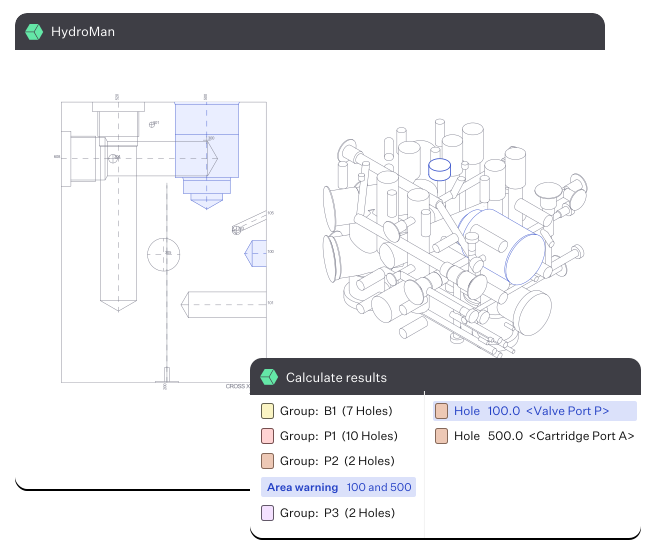
Create connections directly in the 3D isometric editor and access cross-sections in the 2D view for full command of the design process.
From simple mobile crane manifolds to complex presses, bring your manifold to life with HydroMan.
Measure once, design once
Manifold design is a complex, error-prone task.
Eliminate errors and say goodbye to guesswork with HydroMan’s built-in checklist — ensuring the right wall thickness and proper connections every time.
Even with a 900-hole manifold, HydroMan’s checklist automatically identifies potential mistakes as you design, increasing your efficiency and accuracy with every action.
Automate, generate
With just one click, HydroMan generates your circuit checklist, drilling list, production and assembly drawings, and your Bill of Materials.
You get access to nearly all drilling models and cavity tooling through the Paro Component Library, each linked to detailed product information sheets.
Your drawings are connected to the library, ensuring accuracy in design, in a fraction of design-time.
A component for every job
From Bosch Rexroth to Hydac, NACHI to Wandfluh, the Paro Component Library contains over 1 million hydraulic components.
Whatever specific hole pattern or cavity you need, find the right component to complete your design.
Every component has been checked by our practicing engineers, and is linked to the manufacturer’s product sheet.
Can’t find your component?
We’ll create it for you, free of charge — yes, even during your free trial.
From 1:1 training to unlimited, direct-access customer support, at Paro we believe in working with our customers until they’re completely satisfied.
Every customer receives free, 1:1 training from one of our engineers (we’ll say it twice, in case you missed it the first time round).
Want to talk over your design? Want another engineer to look over your drawing? Send it to us, and we’ll make time to help you perfect your manifold.
Your success is our success.
Engineers at every step
Since 1974, Paro has been building solutions for hydraulic engineers. Today, we’re still practising engineers, using HydroMan to support a global base of hydraulic clients.
That’s why we’re proud to support you as you design and draw.
We know what it takes to plan, design and create hydraulic manifolds. We’re with you, every step of the way.
That’s the Paro Promise.
Request a free HydroMan demo
Interested in seeing HydroMan in action?
Ask for a free demo today! One of our hydraulic engineers will give you a 1:1 online demonstration.
They’ll walk you through the software live, answer your questions, and help you get started.
HydroMan is stand-alone 3D hydraulic manifold design software. By importing schematics from HydroSym, HydroMan helps you produce accurate, error-free manifold designs.
Is it possible to create a HydroMan drawing without using HydroSym?
Yes, you can design a hydraulic manifold in HydroMan without a HydroSym schematic. First, select the appropriate components and groups from the Paro component library. Then, HydroMan will help you create an optimized design in the same way as with a HydroSym schematic.
Is HydroMan compatible with other CAD programs?
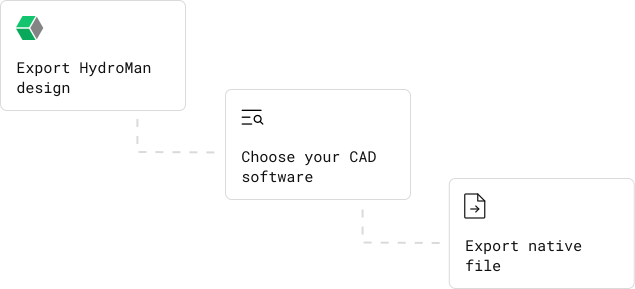
Yes. Details from HydroMan can easily be exported to frequently used CAD programs including Inventor, SolidEdge, SolidWorks, AutoCAD, PTC Creo, FreeCAD, and many others.
Which cavities, holes and patterns are available in the Component Library?
The Paro Component Library includes over one million hydraulic components. If your component, cavity, hole or pattern is not available you can create your own and add these; or we can add them for you, free of charge. Just email us on library@paro.nl.
Can I add cavities and patterns to the Library myself?
Yes, it’s very easy to create your own cavities and patterns, and to add these to the Library. We can also add cavities and patterns for you, free of charge. Just email us on library@paro.nl.
What are the hardware requirements for HydroMan?
HydroMan is not based on heavy 3D programs, so the requirements concerning hardware are relatively low. A simple PC with Windows is sufficient, but we recommend using a graphics card with two ports.